Construction de NuxiPro Cloud : les nouveautés
J’ai décidé de rendre la version Cloud de NuxiPro sécurisée et minimaliste au quotidien, sans me soucier de l’outil lui-même, d’autant plus qu’il va stocker mes propres données personnelles et professionnelles.
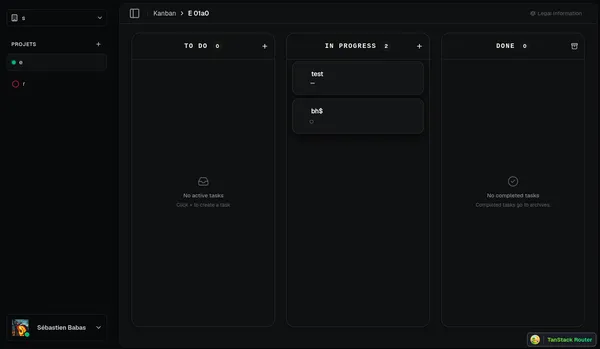
Pour l’instant, cette version de mon projet n’est pas encore prête ni assez fonctionnelle pour gérer des données réel.
Ma stack technique backend
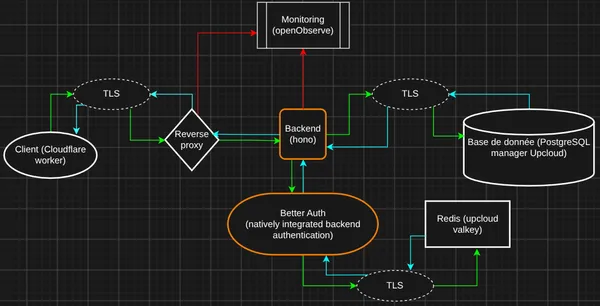
Section intitulée « Ma stack technique backend »Voici les technologies que j’ai ajoutées à Cloud NuxiPro :
- Better Auth (pour l’authentification)
- Drizzle (ORM pour PostgreSQL)
- Hono (pour le serveur backend)
- Fractional indexing (pour gérer la position des tâches sur le tableau Kanban)
- Nginx (reverse proxy prévu devant le backend avant le lancement de Cloud NuxiPro)
- TypeScript (langage principal du backend)
- Bun (runtime pour exécuter le backend)
- date-fns (pour la gestion des dates)
- Zod / Hono validator (pour valider les données entrantes et sortantes)
- OpenObserve (pour la gestion centralisée des logs)
Pourquoi ce choix pour le backend ?
Section intitulée « Pourquoi ce choix pour le backend ? »J’ai choisi cette stack pour rendre NuxiPro efficace, prévisible, et garantir une sécurité résiliente. Puisque j’y stockerai mes propres données, et que je vois régulièrement des SaaS se faire pirater, j’ai refusé d’être le prochain sur cette liste. Mon objectif est de construire un système où les utilisateurs sont en sécurité grâce à un outil souverain, hébergé en Finlande chez UpCloud (souverain, performant, et très attractif niveau prix).
J’ai opté pour Hono et Better Auth parce qu’ils sont simples à utiliser, très efficaces, et m’aident à construire une sécurité solide.
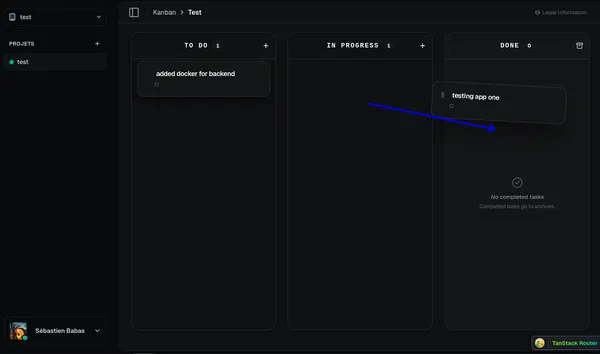
J’ai aussi intégré le Fractional indexing pour gérer la position des cartes sur le tableau Kanban de la manière la plus efficace possible. Cela permet de glisser-déposer une tâche entre deux colonnes ou au-dessus d’une autre sans avoir à réécrire la valeur de toutes les autres tâches. En bref, ça évite les collisions tout en gardant une expérience fluide au quotidien.
Pour centraliser mes logs et gérer les erreurs, j’utilise OpenObserve. L’objectif est de repérer et corriger les crashs rapidement. Avant même la sortie de la version Cloud, je vais faire passer des tests intensifs avec pour objectif explicite d’essayer de faire planter mon système.
Cela me permettra de confirmer s’il est vraiment robuste. Bien sûr, cela n’exclura pas 100% des futurs bugs, mais ces tests de crash prouveront la solidité de l’outil.
Ma stack technique frontend
Section intitulée « Ma stack technique frontend »- TypeScript (pour la simplicité et la sécurité des types)
- TanStack Router / Query (pour gérer les pages dynamiques et l’état)
- React (pour construire l’interface utilisateur)
- Zod & React Hook Form (pour valider les données des formulaires)
- shadcn/ui (pour ne pas recréer l’interface depuis zéro et perdre du temps sur des bugs UI inutiles)
- Tiptap (pour construire l’éditeur Markdown)
- dnd kit (pour un glisser-déposer fluide sur le tableau Kanban)
- Bun, Vite & Hono Client (pour le build, le bundling, et la communication avec l’API)
Pourquoi ce choix pour le frontend ?
Section intitulée « Pourquoi ce choix pour le frontend ? »J’ai choisi cette stack parce qu’elle est simple, maintenable sur le long terme, et conçue pour durer plusieurs années sans devenir obsolète imédiatement.
Pourquoi ai-je choisi cette stack globale ?
Section intitulée « Pourquoi ai-je choisi cette stack globale ? »J’ai conçu cette stack principalement pour construire un outil de travail quotidien efficace, simple, sans bruit visuel inutile qui fait perdre du temps.
Ma priorité reste un outil adapté aux personnes qui travaillent seules. Aujourd’hui, la plupart des logiciels n’arrêtent pas d’empiler des fonctionnalités au lieu de simplifier, ce qui crée de la friction au quotidien.
Étant quelqu’un de très exigeant sur la sécurité, la performance, je veux que mon propre outil de travail soit efficace et ne demande aucune énergie à gérer. NuxiPro est là pour m’aider chaque jour, dans mes projets professionnels et personnels.